


The laptop industry has reached an inflection point in 2026. While manufacturers pack increasingly powerful processors and graphics cards into ever-slimmer chassis, the physics of heat dissipation haven’t changed—creating a thermal management challenge that directly impacts every aspect of your computing experience. Modern laptops routinely generate over 150 watts of heat during intensive tasks, concentrated in spaces smaller than a paperback novel. Without sophisticated cooling systems, this heat triggers performance throttling, accelerates component degradation, and transforms your productivity tool into an uncomfortable hot plate. Whether you’re a gamer demanding consistent frame rates, a creative professional rendering 4K video, or a business user running AI workloads on Copilot+ PCs, understanding laptop cooling has become essential to making informed purchasing decisions that protect your investment and ensure sustained performance.
Why Cooling Has Become a Primary Concern in 2026
The computational arms race has fundamentally altered the thermal landscape of mobile computing. Three converging factors have elevated cooling from a background concern to a critical purchasing consideration.
Power Density Reaches Critical Thresholds
Modern processors and graphics cards deliver unprecedented performance, but that power comes with substantial thermal costs. Intel’s 14th Generation Core processors can briefly consume over 100 watts during boost periods, while AMD’s Ryzen 9000 series processors similarly push thermal boundaries to extract maximum performance. When you browse Intel Gaming Laptops or AMD Gaming Laptops, you’re looking at systems that must effectively manage heat loads equivalent to small space heaters.
The introduction of NVIDIA’s RTX 50 Series has further intensified thermal demands. These GPUs pack thousands of CUDA cores and dedicated AI acceleration hardware into mobile form factors, with total graphics power (TGP) ratings reaching 175 watts in high-performance configurations. The NVIDIA GeForce RTX 50 Series Laptops available today represent the pinnacle of mobile graphics performance, but they also present the most demanding cooling requirements ever seen in portable computers.
 The Thermal Throttling Performance Tax
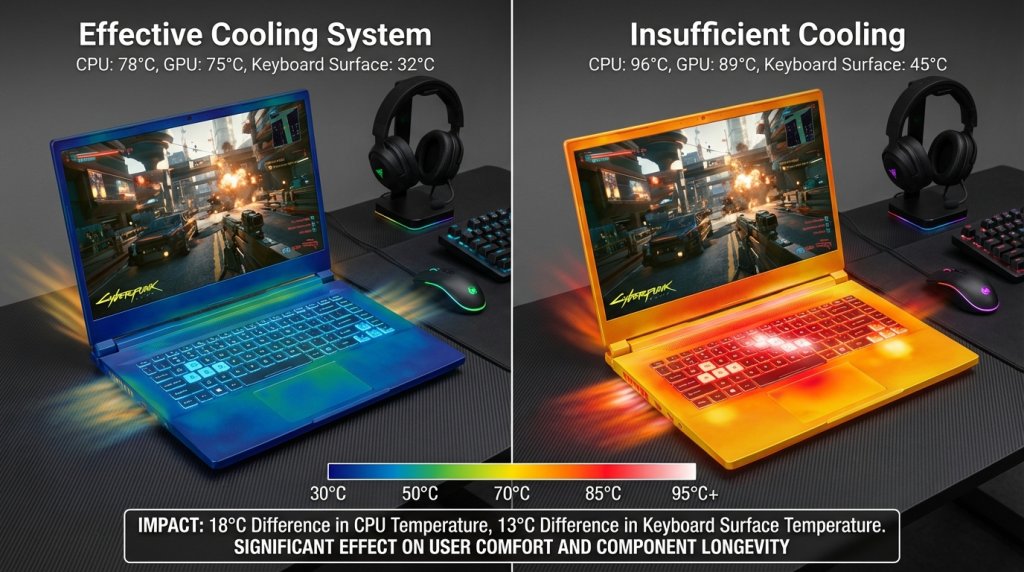
When laptop temperatures exceed safe operating thresholds—typically 95-100°C for CPUs and 85-90°C for GPUs—automatic thermal throttling kicks in. The system reduces clock speeds to prevent damage, directly sacrificing the performance you purchased. In poorly cooled laptops, this can result in 20-40% performance degradation during sustained workloads. Your expensive gaming laptop suddenly struggles to maintain 60 FPS. Your video export that should take 10 minutes stretches to 15. That machine learning model training session runs significantly slower than benchmark results suggested.
Component Longevity and Reliability
Heat accelerates the aging process of every electronic component in your laptop. For every 10°C increase in operating temperature, component lifespan can decrease by approximately 50%. A laptop consistently running at 95°C versus one maintained at 75°C could experience twice the degradation rate, potentially shortening usable lifespan by years. This particularly affects battery health, storage devices, and the delicate silicon of processors and graphics cards.
Revolutionary Cooling Technologies in Modern Laptops
The thermal challenges of 2026 have driven remarkable innovation in laptop cooling technology. Manufacturers have developed sophisticated multi-layered approaches that combine cutting-edge materials with intelligent software control.
Advanced Heat Transfer Materials
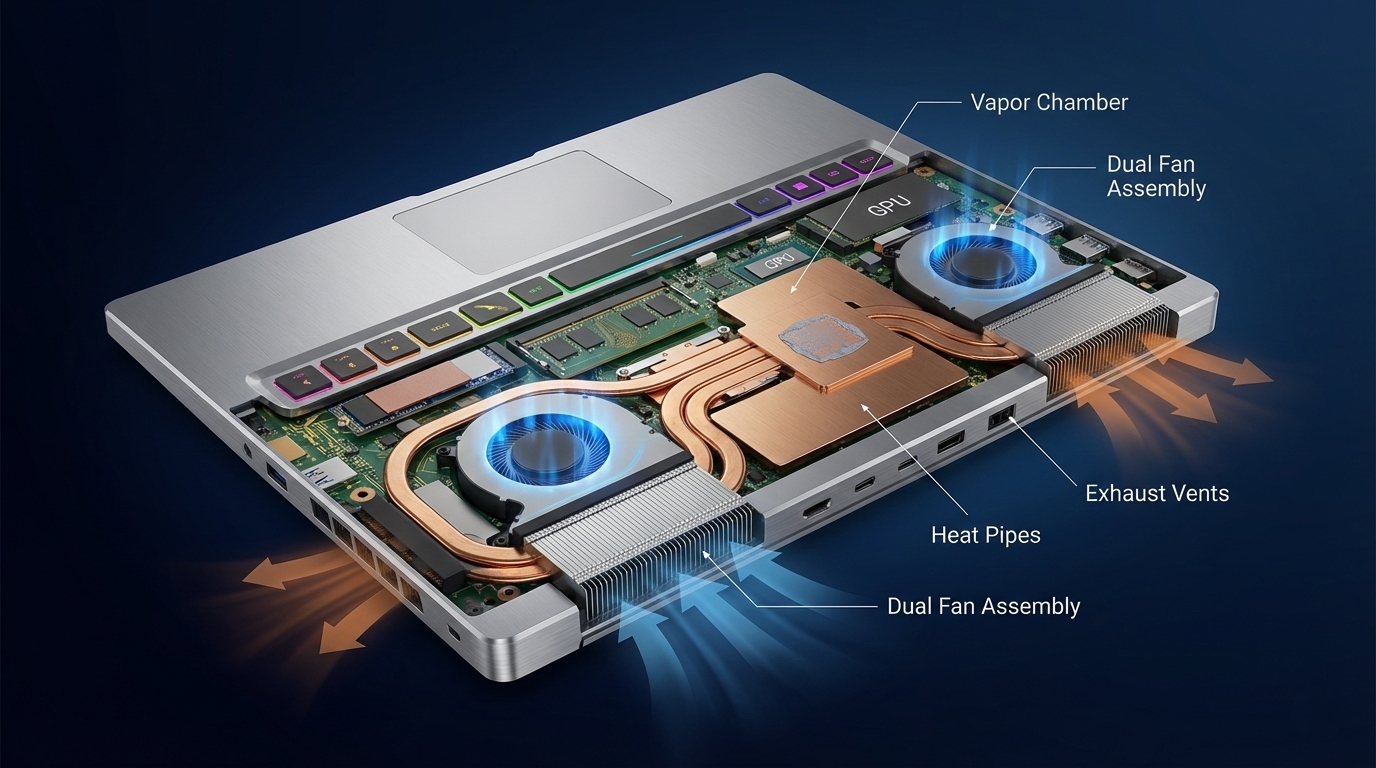
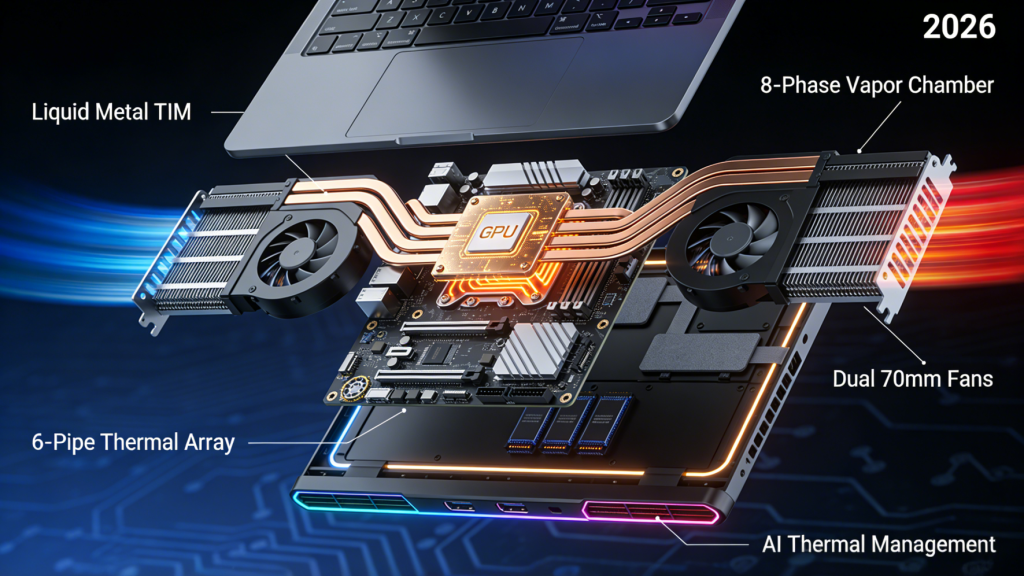
Liquid metal thermal compounds have transitioned from exotic solutions to mainstream implementations in premium laptops. These compounds offer thermal conductivity rates 3-5 times higher than traditional thermal paste, dramatically improving heat transfer from processors to heatsinks. Combined with precision-engineered vapor chamber technology, modern cooling systems can spread heat across larger surface areas more effectively than ever before.
Vapor chambers work by enclosing a small amount of liquid in a sealed chamber. As processors generate heat, the liquid vaporizes, carrying thermal energy across the chamber where it condenses on cooler surfaces, then returns via capillary action. This phase-change process moves heat with remarkable efficiency, enabling thinner laptop designs without thermal compromises.
Intelligent Thermal Management Systems
The most advanced Gaming Laptops now incorporate AI-driven thermal management that learns your usage patterns. These systems predict thermal demands based on application launches and historical data, preemptively adjusting fan curves and power limits to optimize the balance between performance, noise, and temperature. During light productivity tasks, fans remain whisper-quiet. Launch a demanding game, and the cooling system seamlessly scales up before temperatures rise.
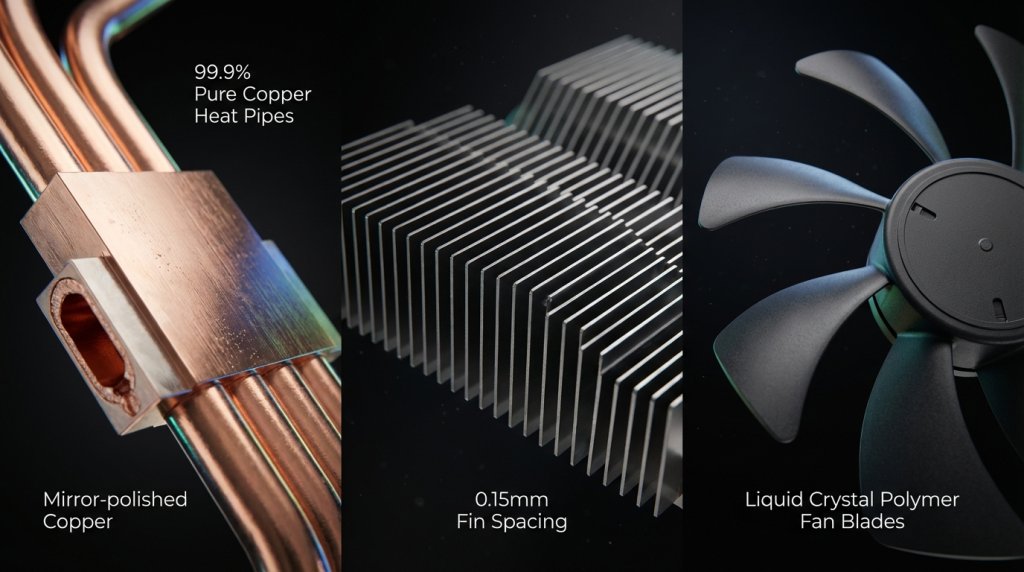
Multi-heat pipe designs have become standard in performance laptops, with premium models featuring 5-7 dedicated heat pipes connecting critical components to dual or triple fan assemblies. These configurations create redundant thermal pathways, ensuring effective cooling even under maximum load conditions.
 Cooling Requirements Across Different Use Cases
Not all laptops face identical thermal challenges. Understanding your specific use case helps identify appropriate cooling specifications.
Gaming and High-Performance Computing
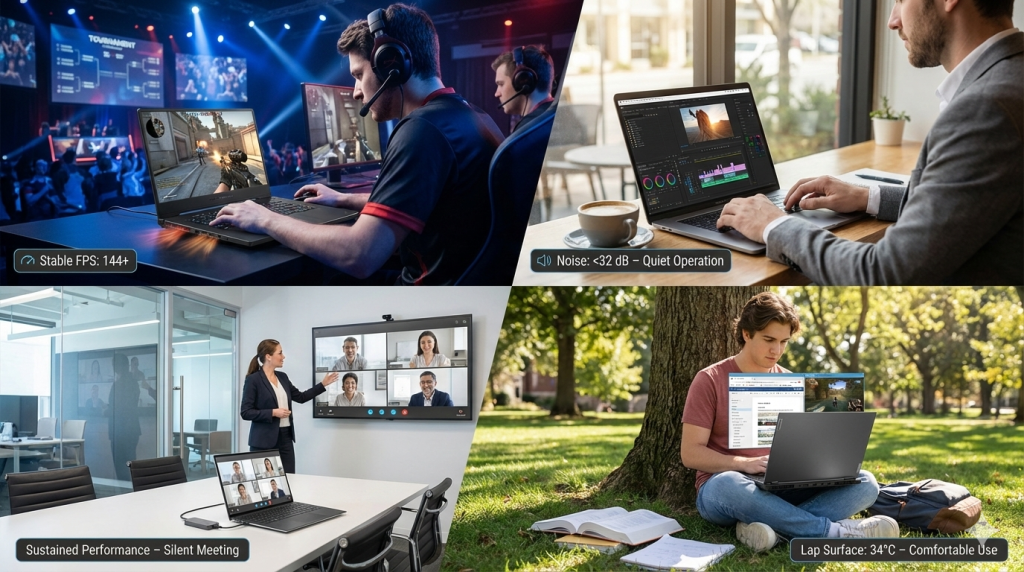
Intensive gaming represents perhaps the most demanding sustained thermal workload. Modern AAA titles simultaneously stress both CPU and GPU for hours, generating maximum heat output. Quality Gaming Laptops address this through robust cooling solutions featuring large-diameter fans (often 70mm or greater), extensive heat pipe networks, and generous ventilation. Look for models with intake vents on the bottom and exhaust vents on the rear and sides to maximize airflow.
Business and Productivity Systems
Business Laptops face different priorities. While they rarely encounter gaming-level thermal loads, they must remain quiet during meetings and video calls while still cooling efficiently during bursts of intensive work. Modern business systems employ temperature-aware fan curves that keep noise below 35dB during typical office tasks while still providing adequate cooling headroom for occasional intensive workloads like video encoding or large dataset processing.
Convertible and Compact Form Factors
2-in-1 Laptops present unique thermal constraints. Tablet modes limit ventilation options, and fanless designs, while perfectly silent, depend entirely on passive cooling through the chassis. These systems typically use lower-power processors with 15-28 watt TDP ratings, carefully matched to chassis thermal capabilities. They excel for productivity and media consumption but aren’t suitable for sustained intensive workloads.
 How to Evaluate Laptop Cooling When Shopping
Making informed decisions about laptop cooling requires understanding key specifications and real-world performance indicators.
Understanding TDP and TGP Ratings
Thermal Design Power (TDP) for processors and Total Graphics Power (TGP) for GPUs indicate the maximum sustained heat output the cooling system must handle. A processor with a 45-watt TDP requires a cooling solution capable of continuously dissipating 45 watts of heat. However, boost behaviors can temporarily exceed TDP ratings by 50% or more, so effective cooling systems must provide substantial headroom beyond base specifications.
When using the Laptop Finder tool, pay attention to both processor TDP and GPU TGP ratings in relation to chassis size. A thin 15-inch laptop with a 65-watt CPU and 140-watt GPU will face significant thermal constraints compared to a thicker gaming laptop with identical specifications but superior cooling infrastructure.
Material Considerations and Build Quality
Chassis materials significantly impact thermal performance. Aluminum and magnesium alloy chassis act as effective heat spreaders, helping dissipate warmth across larger surface areas. Premium laptops often feature aluminum bottom panels with ventilation grilles that serve dual purposes—structural reinforcement and heat dissipation. While plastic chassis can incorporate adequate cooling, metal construction generally provides superior thermal characteristics.
Upgradeability and Thermal Impacts
Component upgrades affect thermal characteristics. Higher-capacity RAM modules generate marginally more heat, though the difference is usually negligible. Storage choices matter more—modern NVMe SSDs can reach 70-80°C during intensive operations. Quality laptops include thermal pads between M.2 drives and chassis or dedicated heatsinks to manage SSD temperatures, protecting data integrity and drive longevity.
Making Your Purchase Decision
Armed with thermal knowledge, you can shop confidently for laptops that maintain performance over years of use. The Premium Laptop Upgrades Deal section frequently features systems with proven cooling capabilities at attractive prices.
When evaluating options, prioritize reviews that include thermal testing data. Look for sustained workload temperatures, not just idle or short burst scenarios. Quality cooling systems keep CPU temperatures below 85°C and GPU temperatures below 80°C during extended gaming or rendering sessions. Fan noise levels matter too—effective cooling shouldn’t require jet-engine acoustics.
Consider your environment and usage patterns. If you work in quiet spaces or attend frequent video meetings, prioritize systems with documented low-noise profiles. If maximum performance is paramount and you game with headphones, aggressive cooling with higher noise levels becomes acceptable.
Remember that effective cooling directly translates to sustained performance, longer component life, and better resale value. The best laptop cooling system is one you never think about because it consistently maintains optimal temperatures while remaining unobtrusive—delivering the performance you need, whenever you need it, for years to come.
Related Posts
- Laptop Upgrade Planning Guide 2026: Essential Pre-Purchase Checks for Future Expandability
- Do Laptops Overheat? What Buyers Need to Know About Heat and Fan Noise in 2026
- Overview: MSI Prestige 14 EVO Specs and Capabilities
- Wi-Fi 8 Is Almost Here: What ASUS’s Wi-Fi 8 Routers Actually Mean
- Best OLED Gaming Monitors in 2026